


Locking the vehicle with full alarm
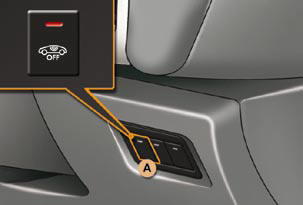
Activation
- Switch off the ignition and get out of the vehicle.
- Lock or deadlock the vehicle using the locking button on the remote control.
The alarm is activated; the indicator lamp on button A fl ashes once per second.
Deactivation
Unlock the vehicle using the unlocking button on the remote control.
The alarm is deactivated; the indicator lamp on button A switches off.
See also:
Automatic centralised control
System which provides full automatic
locking or unlocking of the doors and
the boot while driving.
You can activate or deactivate this function.
Locking
When the speed exceeds 6 mph
(10 km/h), t ...
Checks / Oil level
Log of alerts
This function allows you to display the log of alerts.
Press on button A. The following messages appear consecutively on the instrument
panel screen:
Tyre pressure check.
Mainten ...
MP3 CD source
MP3 CDs
The MP3 format (MPEG 1,2 & 2,5 Audio Layer 3) is an audio compression standard
that permits recording of 10 times as many musical files on one CD.
Your radio only plays back files whic ...