


Display C
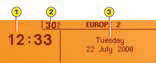
Presentation:
1 - Time.
2 - Ambient temperature
3 - Date and Display zone
If the outside temperature is between +3 °C and -3 °C, the temperature display flashes (risk of ice).
Note: the outside temperature displayed may be higher than the actual temperature if the vehicle is standing in bright sunlight.
The driver is advised not to operate the controls when driving.
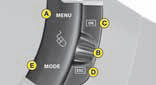
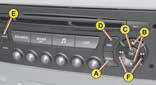
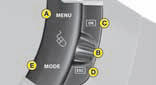
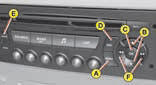
Controls
A - A ccess to the "Main menu".
B - S crolling in the display menus.
C - Validation and selection in the menus of the function chosen or the value modified.
D - C ancellation of the operation or return to the previous display.
E - S election of the type of information you wish to see permanently displayed
(date, radio-CD, trip computer) on the right of the screen.
Main menu
Press control A to display the "Main menu" for the multifunction screen. Using this menu, you have access to the following functions:

Radio-CD
(See "Radio")

Bluetooth hands-free kit
(See "Radio")

Trip computer
It allows:
- D istance to your destination.
- A ccess to log of alerts (list of the alerts that have been previously signalled).
- A ccess to status of functions, for example activation/deactivation of automatic
lighting of head-lamps, ESP, windscreen wipers.
 Personalisation Configuration
It allows you to activate/ deactivate:
- T riggering of rear screen wipe.
- A utomatic guide-me-home lighting, with choice of duration.
- D riving headlamps.
Also to choose:
- Brightness, the time, the date, units.
- T he display language.
To activate/deactivate rear wipe on engaging reverse gear
- P ress on A.
- Use B to select the trip computer icon, then confirm with a press on C.
- S elect your entry of distance, using B. Confirm your choice with a press on C.
- T o choose the distance, select the figure to be modified, using B, then confirm
with a press on C.
- U se B to adjust the value then validate with a press on C.
- Validate on "OK" on the display.
To activate/deactivate automatic guide-me-home lighting
- P ress on A.
- U se B to select the icon "Personalisation-Configuration" then confirm your choice
with a press on C.
- T hen select the sub-menu for vehicle parameters. Confirm your choice with a press
on C.
- Using B, select lighting and signalling. Confirm your choice with a press on C.
- T hen with a press on C, select/ deselect guide-me-home lighting to activate or
deactivate it. After activation, choose the duration: press on C then use B to select
the duration and press on C.
- Validate on "OK" on the display.
To activate/deactivate the directional headlamps
- P ress on A.
- U se B to select the icon "Personalisation-Configuration" then confirm your choice
with a press on C.
- T hen select the sub-menu for vehicle parameters. Confirm with a press on C.
- Using B, select the driving assistance. Confirm your choice with a press on C.
- T hen with a press on C, select/ deselect driving headlamps to activate or deactivate
them.
- Validate on "OK" on the display.
To adjust the display brightness
- P ress on A.
- U se B to select the icon "Personalisation-Configuration" then confirm your choice
with a press on C.
- Select the display configuration using B. Confirm with a press on C.
- S elect the adjustment of brightness. Confirm with a press on C.
- U se B to select normal or other display mode, then validate with a press on C.
To adjust the brightness, select the symbols "+" or "-" and confirm your adjustment
with a press on C.
- Validate on "OK" on the display.
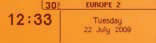
To adjust the date and time
- P ress on A.
- U se B to select the icon "Personalisation-Configuration" then confirm your choice
with a press on C.
- Select the display configuration using B. Confirm with a press on C.
- S elect the date and time adjustment, using B, then confirm with a press on C.
- Use B to select the values to be modified. Confirm with a press on C.
- Make your adjustments using B, validating each adjustment with a press on C.
- Validate on "OK" on the display.
To choose units
- P ress on A.
- U se B to select the icon "Personalisation-Configuration" then confirm your choice
with a press on C.
- Select the display configuration using B. Confirm with a press on C.
- T hen select the sub-menu for Units. Confirm with a press on C.
- U sing B, select the unit to be modified (Temperature or Consumption) then validate
with a press on C.
- Validate on "OK" on the display.
Note: This choice concerns all the types of information (fuel consumption, speed, etc.) that appear on the displays.
To choose the language
- P ress on A.
- U se B to select the icon "Personalisation-Configuration" then confirm your choice
with a press on C.
- S elect the choice of language, using B.
- U sing B, select the desired language and validate your choice with a press on
C.
- Validate on "OK" on the display.
See also:
Exterior perimiter protection
The system detects opening of the vehicle.
The alarm is triggered if anyone tries to
enter the vehicle by forcing a door, the
boot or the bonnet. ...
Interior mirror
Adjustable mirror providing a central
rearward view.
Manual model
The mirror is fi tted with a night-time
anti-dazzle device.
Adjustment
Adjust the mirror so that the glass is
directed correc ...
Remote control problem
Following disconnection of the vehicle
battery, replacement of the remote control
battery or in the event of a remote
control malfunction, you can no longer
unlock, lock or locate your vehicle.
F ...