


Getting started
Front seats
Manual adjustments
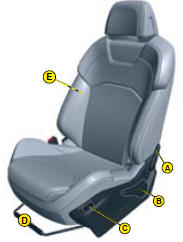
A. Adjustment of the backrest angle.
B. Adjustment of the seat height and angle.
C. Heated seat control.
D. Longitudinal adjustment of seat.
E. Adjustment of the backrest lumbar support.
Electrical adjustments
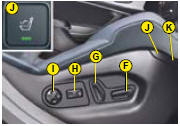
F. S eat height and slide adjustments.
G. Adjustment of the backrest angle.
H. Adjustment of top of backrest.
I. Adjustment of 2 axis lumbar support.
J. Massage function.
K. Heated seat control.
Seat belt height adjustment
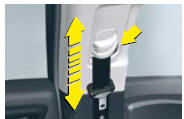
The correct positioning of the belt strap is through the middle of the shoulder. See “Seat belts”.
To adjust the seat belt for height, compress the control and slide it in the desired direction.
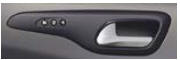
Memorisation
The Memorisation function allows you to programme the driver’s seat, rear view mirrors and air conditioning settings.
Electric exterior rear view mirrors
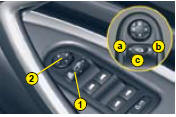
1. S election of rear view mirror:
a - Left hand side.
b - Right hand side.
c - Foldback / Deployment.
2. Directional control for mirror selected
Automatic electrochrome rear view mirror
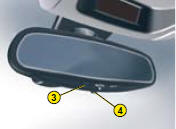
This automatically and progressively adapts to day-time or nighttime use.
Operation Switch on the ignition and press button 4.
Warning lamp 3 on: automatic mode.
Warning lamp 3 off: automatic mode stopped. The mirror remains in its lightest definition.
Steering column adjustment
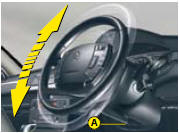
With the vehicle at rest, unlock the steering wheel by pushing control A forwards.
Adjust the height and the reach of the steering wheel, then lock the position by pulling the lever upwards.
See also:
Replacing a fuse
Fuse box
There are two fuse boxes, one below the dashboard and one under the bonnet.
Fuses under the dashboard
To access the fuses below the dashboard, pull back the access cover, undo the
screws ...
Charging the battery using a
battery charger
Disconnect the battery from the vehicle.
Follow the instructions for use provided
by the manufacturer of the
charger.
Reconnect starting with the negative
terminal (-).
Check that the t ...
Mats
Removable component which protects
the carpet against exterior dirt.
Fitting
When fi tting the mat for the fi rst time,
on the driver's side, use only the fi xings
provided in the wallet attached ...