


Xenon dual function directional headlamps - Angled lighting
With dipped beams or main beams, the Directional headlamps function turns the headlamps in the direction the road ahead is taking. Your vision on bends is considerably enhanced.
This function is activated once your vehicle speed reaches 10 km/h (6 mph) and stops when your speed decreases to 5 km/h (3 mph).
Note: An automatic correction of the beam height enables you not to dazzle other drivers.
Activation/Deactivation
Activated by default, this function can be activated/deactivated in the “Main Menu” of the instrument panel screen. To do so, select “Vehicle parameters / Lighting / Directional headlamps”.
The activated/deactivated status is retained when you switch off the engine.
Note: This function is not active when the vehicle is stationary, moving at very low speed, or in reverse gear.
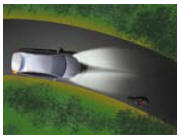
Function deactivated
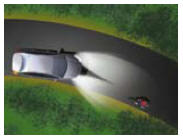
Function activated
This device is linked with the Angular lighting which lights up the inside of a bend when the vehicle speed is lower than 40 km/h (25 mph). This maximises the lighting at intersections and when parking, for example.
The angular lighting is deployed:
When the direction indicators are activated, and/or from a certain angle of rotation of the steering wheel.
Note: The angular lighting is deactivated when the directional headlamps are deactivated
 If there is a malfunction, the
“Dipped beams” warning lamp flashes, accompanied by a message on the instrument
panel. Contact a CITROËN dealer.
If there is a malfunction, the
“Dipped beams” warning lamp flashes, accompanied by a message on the instrument
panel. Contact a CITROËN dealer.
See also:
Checks / Oil level
Log of alerts
This function allows you to display the log of alerts.
Press on button A. The following messages appear consecutively on the instrument
panel screen:
Tyre pressure check.
Mainten ...
General
(*) Weight transfer: The braked towing weight can be increased. It is possible,
when the towing vehicle is within the gross vehicle weight, to transfer weight allowance
from the trailer. In all ...
Temporary puncture repair kit
Complete system consisting of a compressor
and an incorporated sealant cartridge
which permits temporary repair of the
tyre so that you can drive to the nearest
garage. ...