


Remote control
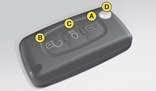
Central unlocking
A short press on button B unlocks your vehicle.
This operation is confirmed by the rapid flashing of the direction indicators and the lighting of the interior lamp (if the function is activated). It can also deploy the exterior rear view mirrors.
Central locking, closing windows, deadlocking
- A short press on button A locks your vehicle.
- A long press on button A locks your vehicle and closes the windows.
This operation is confirmed by the direction indicators illuminating for approx. two seconds and by the interior lamp switching off. This also folds the exterior rear view mirrors.
If any of the doors, or the boot, is open or not properly closed, central locking does not operate.
For vehicles equipped with deadlocking, two successive presses on button A deadlocks the vehicle.
It is then impossible to open the doors from either inside or outside the vehicle.
Note: The simultaneous use of other high frequency equipment (mobile telephones, domestic alarms...) may momentarily hinder the operation of the remote control.
In the event of a permanent fault, the remote control should be reinitialised. (See next page).
It is dangerous to deadlock the vehicle when someone is inside as unlocking from the interior is impossible (without the remote control). When closing the windows using the remote control, the user should make sure that nobody is obstructing the windows from shutting properly.
Guide-me-home lighting
A press on button C operates the guide-me-home lighting (illumination of the sidelamps and dipped beams for approx. one minute).
A second press prior to the end of this timing cancels the guide-mehome lighting.
Locating of the vehicle
To locate the vehicle in a carpark, press button A, the interior lamps come on and the direction indicators flash for a few seconds. The vehicle remains locked.
Folding and ejection of the key
Button D is for folding and ejecting the key from its housing in the remote control.
If you do not press on button D, you could damage the mechanism.
Take care not to place the remote control in contact with grease or dust, or leave it in the rain or in a damp environment. A hard object also on the key ring, pressing on the key while it is in the ignition, can cause a malfunction.
Changing the remote control battery
Unclip the cover to gain access to the battery.
Battery: CR 0523: 3 V.
Re-initialisation of the remote control
After a change of battery, it is necessary to re-initialise the remote control. To do that, switch on the ignition and immediately action button A on your remote control to trigger the action desired. This may take some ten seconds.
Do not throw away the old batteries. They should be returned to the CITROËN dealer or deposited in a recognised recycling facility.
Except when reinitialising, the remote control cannot function while the key is in the ignition, even when switched off. Warning: By inadvertently actioning the remote control, when for example it is in your pocket, you can unlock the vehicle without your realising it. However, if no door is opened with 30 seconds of unlocking, the vehicle locks itself again automatically, without arming the alarm. Warning: There a is a risk of damage if the replacement battery is not the correct one. Only use batteries that are identical or equivalent to those approved by CITROËN.
See also:
Signalling
Direction indicators
Left: move the stalk downwards.
Right: move the stalk upwards.
Movement of the steering wheel returns the stalk to the off position automatically.
Headlamp flash
Pull the s ...
Parking space sensor
The “Parking Space Sensor” function assists you in finding a parking space. It
measures the size of the space and gives you information on:
The possibility of parking in a free space, depending o ...
Comfort
...