


Ignition switch
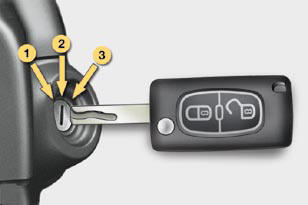
- Position 1: Stop
- Position 2: Ignition
- Position 3: Starting
See also:
Locating your vehicle
Press the closed padlock
to locate your locked vehicle
in a car park.
This is indicated by lighting of the courtesy
lamps and fl ashing of the direction
indicators for a few seconds. ...
Electric parking brake
The electronic parking brake combines 2 operational modes:
AUTOMATIC:
Automatic application when the engine is stopped and automatic release on use
of the accelerator (automatic operation by def ...
Language selection
Once this menu has been selected,
you can change the language used
by the display (Deutsch, English,
Espanol, Français, Italiano, Nederlands,
Portugues, Portugues-Brasil, Türkçe ...