


Opening
Remote control
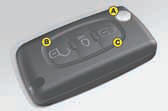
A. Unfolding/folding the key.
B. Unlocking the vehicle.
C. Locking the vehicle.
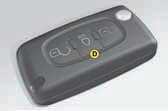
D. Activating/deactivating guide-me-home lighting.
Manual central locking
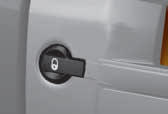
Press once to lock the vehicle. Press again to unlock the vehicle.
In addition...
A long press on button C locks the vehicle and closes the windows. Two successive presses on button C deadlocks the vehicle.
See also:
Changing a wheel
Procedure for changing a faulty wheel
for the spare wheel using the tools provided
with the vehicle. ...
Parking assistance
Front
Proximity sensors are located in the front and rear bumpers of your vehicle.
When manoeuvring whether forwards or in reverse, at a speed below approximately
10 km/h (6 mph), they warn you ...
Vehicle identification
All original CITROËN replacement parts are available from CITROËN. It is in the
user’s interest, for his safety and for the sake of the warranty, to reject all
other parts. Fitting par ...