


Dashboard lighting rheostat
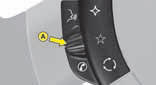
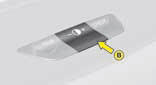
The rheostat is active if the sidelamps are on and applies to:
- the instrument panel
- the displays
The desired brightness is selected via control A or by pressing control B.
With control B, press until the brightness is at maximum. Release, press until you reach minimum.
See also:
Directional headlamps
This function is associated with headlamps that have Xenon bulbs. Whether on
dipped beam or main beam, your headlamps follow the direction of the road ahead.
Lighting quality when driving round ben ...
Front passenger’s airbag
1. Open the glove box.
2. Insert the key.
3. Select position:
"ON" (activation), with front passenger
or "forwards facing" child seat,
"OFF" (deactivation), with & ...
Fuses under the bonnet
Only authorised personnel from the CITROËN network are allowed to carry
out any work on the additional protection MAXI fuses located in the fuse boxes. ...