


Ignition switch
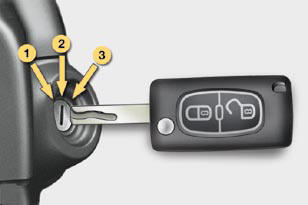
- Position 1: Stop
- Position 2: Ignition
- Position 3: Starting
See also:
Operating fault
In the event of a speed limiter malfunction,
the speed is cleared resulting in
fl ashing of the dashes.
Have the system checked by a
CITROËN dealer.
On a steep descent or in the
event of ...
Summary table for the installation of ISOFIX child seats
In accordance with European regulations, this table indicates the options for
the installation of ISOFIX child seats on the vehicle
seats fi tted with ISOFIX mountings.
In the case of the universal ...
Ambience lighting
The dimmed passenger compartment
lighting improves visibility in the vehicle
when the light is poor. ...