


One-touch electric windows


There are two methods of operation:
- manual mode
Press or pull the switch gently. The window stops as soon as the switch is released.
- automatic mode
Press or pull the switch fully.
The window opens or closes
completely when the switch is
released.
Pressing the switch again stops
the movement of the window.
The electric window switches remain operational for approximately 45 seconds after the ignition is switched off or until a front door is opened.
Safety anti-pinch
The one-touch front electric windows are fi tted with a safety anti-pinch function.
When the window rises and meets an obstacle, it stops and partially lowers again.
In the event of unwanted opening of the window on closing (for example in the presence of frost):
press the switch until it opens
completely,
then pull it immediately until
it closes,
continue to hold the switch for
approximately one second after
the window has closed.
The safety anti-pinch function is not active during these operations.
Deactivating the rear window and door switches
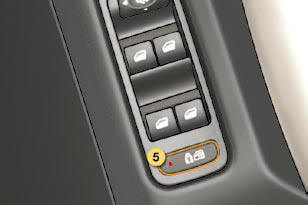
For the safety of your children, press switch 5 to prevent operation of the rear windows irrespective of their position.
With the lamp on, the rear controls are disarmed.
With the lamp off, the rear controls are activated.
This control also deactivates the interior rear door controls (see "Child safety - § Electronic child safety").
See also:
Exiting economy mode
These functions are reactivated automatically
the next time the vehicle is
driven.
In order to resume the use of these
functions immediately, start the engine
and let it run for a few minutes.
T ...
Automatic gearbox
The automatic gearbox offers:
D: operation in auto-active automatic mode, adapting automatically to your style
of driving.
M: operation in sequential mode, with manual gear changing.
D and a pr ...
Fuel consumption
(a) .../1: fi tted with low rolling resistance tyres to reduce consumption
and emissions of CO2.
The fuel consumption fi gures shown here correspond to the values communicated
at the time of prin ...