


Jack socket
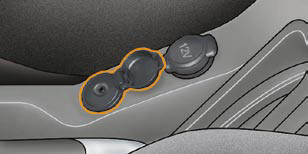
This connection box, consisting of a JACK socket is located on the centre console.
It permits the connection of portable equipment, such as a digital audio player of the iPod ® type.
It reads the audio fi le formats (mp3, ogg, wma, wav, ...) which are transmitted to your audio equipment and played via the vehicle's speakers.
You can manage these fi les using the steering wheel controls or the audio equipment control panel and display them on the multifunction screen.
When it is in use, the portable equipment charges automatically.
For further details concerning the use of this equipment, refer to MyWay Audio system part of the "Audio and Telematics" section.
See also:
Opening
Remote control
A. Unfolding/folding the key.
B. Unlocking the vehicle.
C. Locking the vehicle.
D. Activating/deactivating guide-me-home lighting.
Manual central locking
Press once to lock ...
Trip distance recorder
System which measures a distance
travelled during a day or other period
since it was reset to zero by the driver.
With the ignition on, press the button
until zeros appear. ...
Displays on the screen
This displays the following information:
- time,
- date,
- ambient temperature (this fl ashes if
there is a risk of ice),
- status of the doors and boot,
- audio sources (radio, CD...),
- tri ...