


USB reader
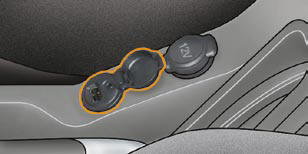
This connection box, consisting of a JACK socket and a USB port, is located on the centre console.
It permits the connection of portable equipment, such as a digital audio player of the iPod ® or USB stick type.
It reads the audio fi le formats (mp3, ogg, wma, wav...) which are transmitted to your audio equipment and played via the vehicle's speakers.
You can manage these fi les using the steering wheel controls or the audio equipment control panel and display them on the multifunction screen.
When it is in use, the portable equipment charges automatically.
For further details concerning the use of this equipment, refer to the Audio system part of the "Audio and Telematics" section.
See also:
Automatic day/night model
System which automatically and progressively
changes between the day
and night uses.
In order to prevent dazzle, the interior
mirror glass darkens automatically in
relation to the intensity of ...
Rear head restraints
These have a high position (comfort)
and a low position (rear visibility).
They can also be removed.
To remove a head restraint:
release the backrest using control 1 ,
tilt the backrest 2 s ...
Getting started
Front seats
Manual adjustments
A. Adjustment of the backrest angle.
B. Adjustment of the seat height and angle.
C. Heated seat control.
D. Longitudinal adjustment of seat.
E. Adjustment of the ...