


Parking brake
Mechanical brake to hold the vehicle when stationary.
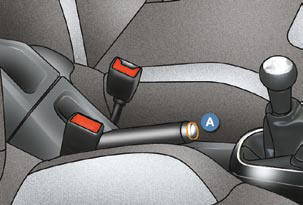
Applying
Pull the parking brake to immobilise your vehicle.
Releasing
Pull on the handle and press the button A to release the parking brake.

When the vehicle is being driven, if this warning lamp and the STOP warning lamp come on, accompanied by an audible signal and a message on the multifunction screen, this indicates that the parking brake is still on or has not been properly released.
When parking on a slope, direct your wheels against the pavement, pull the parking brake on and engage a gear.
See also:
Panoramic sunroof (Tourer)
This device comprises a tinted glass panoramic surface 1 to improve brightness
and vision in the passenger compartment.
It is fitted with an electrical blind 2 to help maintain a comfortable temp ...
Manual parking brake
Parking brake
The parking brake is engaged, with the vehicle stationary, by pulling on the
lever with a force appropriate to the slope.
To facilitate the action on the lever, you are recommended ...
Steering wheel controls
The controls of this system are grouped
together on stalk A .
1. Speed limiter mode selection thumb
wheel
2. Value decrease button
3. Value increase button
4. Speed limiter on/off button ...