


Programming
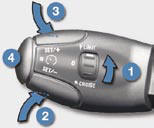
Turn thumb wheel 1 to the "LIMIT" position: the speed limiter mode is selected but is not switched on (PAUSE).
You do not have to switch the speed limiter on in order to set the speed.
Set the speed value by pressing button 2 or 3 (e.g.: 55 mph (90 km/h)).
You can then change the programmed speed using buttons 2 and 3 :
- by + or - 1 mph (km/h) = short press,
- by + or - 5 mph (km/h) = long press,
- in steps of + or - 5 mph (km/h) = maintained press.
Switch the speed limiter on by pressing button 4 .
Switch the speed limiter off by pressing button 4 : the
display confi rms that it has been switched off (PAUSE).
Switch the speed limiter back on by pressing button 4
again.
See also:
Programming
Turn thumb wheel 1 to the
"CRUISE" position: the cruise
control mode is selected but is
not switched on (PAUSE).
Set the programmed speed by accelerating
to the required speed,
then ...
Comfort
...
Ventilation
Air intake
Make sure that the exterior air inlet grille at the base of the windscreen is
clean (free of dead leaves, snow etc.).
If washing the vehicle with a high pressure jet, take care to avo ...