


Steering wheel controls
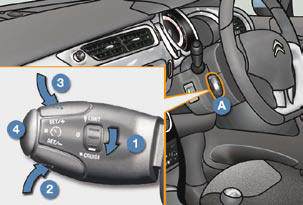
The controls of this system are grouped together on stalk A .
1. Cruise control mode selection thumb
whel
2. Value decrease button
3. Value increase button
4. Cruise control off/resume button
The cruise control cannot, in any circumstances, replace the need to respect speed limits, nor can it replace the need for vigilance and responsibility on the part of the driver.
See also:
Displays
Lighting of the corresponding indicator
lamp on the instrument panel confi rms
the selective switching on of the lighting
selected.
Depending on the version, the instrument
panel may have permane ...
Other adjustments
4. Head restraint height adjustment. ...
Sun visor
Component which protects against sunlight
from the front or the side.
Version without Zenith windscreen
The sun visors are fi tted with a courtesy
mirror, with concealing fl ap for the driver
a ...