


Dashboard lighting rheostat
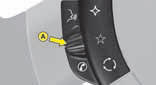
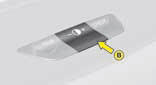
The rheostat is active if the sidelamps are on and applies to:
- the instrument panel
- the displays
The desired brightness is selected via control A or by pressing control B.
With control B, press until the brightness is at maximum. Release, press until you reach minimum.
See also:
Overview
Making its world debut at the 2013 Geneva Motor Show, the new Citroen C3
strengthens and enhances the qualities of its predecessor. The result is even
more C3 with new assets to win over customers ...
Visibility
Lighting
Ring A
Lamps off.
Automatic lighting of headlamps.
Sidelamps.
Dipped beams/main beams.
Pull the control stalk towards you to change between dipped beam and main beam.
Ring B
Fr ...
Manual guide-me-home lighting
Temporarily keeping the dipped headlamps
on after the vehicle's ignition has
been switched off makes the driver's
exit easier when the light is poor.
Switching on
With the ignition off, "f ...