


Navigation
Information for two journeys 1 and 2
A first rotation of control knob A on the steering wheel allows you to display the information for journey 1.
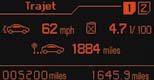
Average speed
This is calculated (since the last reset to zero of the trip computer) by dividing the distance travelled by the time taken (with the engine running).
Average consumption
This is the relationship between the fuel consumed and the distance travelled since the last reset to zero of the selected journey.
Distance travelled
This is the distance that has been travelled since the last reset to zero of the journey selected.
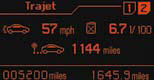
A second rotation of control knob A steering wheel.
allows you to display the information for journey 2.
Journeys
Journeys 1 and 2 are independent of each other but identical in use.
They allow you, for example, to assign journey 1 for daily calculations and journey 2 for monthly calculations.
Reset a journey to zero
When the required journey is displayed, make a long press on the left-hand control knob A on the steering wheel.
Return to the main instrument panel screen display
Successive rotations of the control knob A on the steering wheel allow you to return to the main instrument panel screen display (vehicle speed), via the navigation information screen, then the screen displaying only the total mileage and the trip mileage (bottom of screen).
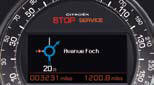
Display of navigation information on instrument panel screen
You can display navigation information on the instrument panel screen by rotating the left-hand knob A on the steering wheel.
See also:
Steering wheel controls
The controls of this system are grouped
together on stalk A .
1. Speed limiter mode selection thumb
wheel
2. Value decrease button
3. Value increase button
4. Speed limiter on/off button ...
Heating/ventilation
Manual control panel
Electric control panel
...
Boot lighting
This comes on automatically when the
boot is opened and switches off automatically
when the boot is closed.
Different lighting times are available:
- when the ignition is off, approximately
ten ...