


Locking the vehicle
Locking using the remote control

Press the closed padlock to lock the vehicle.
Locking using the key
Turn the key to the right in the driver's door lock to lock the vehicle completely.
Locking is confi rmed by fi xed lighting of the direction indicators for approximately two seconds.
According to version, the exterior mirrors fold at the same time.
If one of the doors or the boot is still open, the central locking does not take place.
When the vehicle is locked, if it is unlocked inadvertently, it will relock automatically after thirty seconds unless a door or the boot is open.
The folding and unfolding of the exterior mirrors using the remote control can be deactivated by a CITROËN dealer.
Deadlocking using the remote control

Press the closed padlock to
lock the vehicle completely.
Press the closed padlock again
within fi ve seconds to deadlock the
vehicle.
Deadlocking using the key
Turn the key to the right in the driver’s
door lock to lock the vehicle
completely.
Turn the key to the right again within
fi ve seconds to deadlock the vehicle.
Deadlocking is confi rmed by fi xed lighting of the direction indicators for approximately two seconds.
According to version, the exterior mirrors fold at the same time.
Deadlocking renders the exterior and interior door controls inoperative.
It also deactivates the manual central control button.
Therefore, never leave anyone inside the vehicle when it is deadlocked.
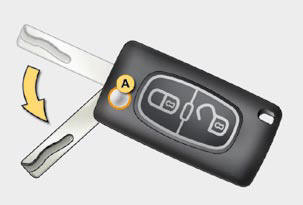
Folding the key
First press button A to fold the key.
See also:
Units
Once the "Units" menu has been selected,
you can change the units of the
following parameters:
- temperature (°C or °F),
- fuel consumption (l/100 km, mpg or
km/l).
Once the fuel consu ...
"Personalisation-Configuration" menu
Once this menu has been selected, you
can gain access to the following functions:
- defi ne the vehicle parameters,
- display confi guration,
- selection of the language. ...
Speed limiter "LIMIT"
1. Selecting/Switching off speed limiter
mode.
2. Decrease the programmed value.
3. Increase the programmed value.
4. Speed limiter on/off.
The values must be set with the engine
running. ...