


USB reader
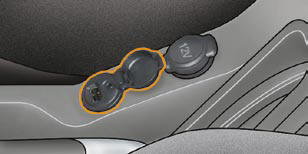
This connection box, consisting of a JACK socket and a USB port, is located on the centre console.
It permits the connection of portable equipment, such as a digital audio player of the iPod ® or USB stick type.
It reads the audio fi le formats (mp3, ogg, wma, wav...) which are transmitted to your audio equipment and played via the vehicle's speakers.
You can manage these fi les using the steering wheel controls or the audio equipment control panel and display them on the multifunction screen.
When it is in use, the portable equipment charges automatically.
For further details concerning the use of this equipment, refer to the Audio system part of the "Audio and Telematics" section.
See also:
Remote control
Note:
The simultaneous use of other high frequency equipment (mobile telephones, domestic
alarms, etc.) may momentarily hinder the operation of the remote control.
If there is a permanent fault, ...
Charging the battery using a
battery charger
Disconnect the battery from the vehicle.
Follow the instructions for use provided
by the manufacturer of the
charger.
Reconnect starting with the negative
terminal (-).
Check that the t ...
Power & dynamics
On the road, the new Citroën C4 combines the highest standards of ride
smoothness and responsive handling for an enjoyable driving experience. The
suspension settings are tailored to the powe ...