


Parking brake
Mechanical brake to hold the vehicle when stationary.
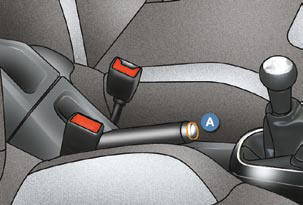
Applying
Pull the parking brake to immobilise your vehicle.
Releasing
Pull on the handle and press the button A to release the parking brake.

When the vehicle is being driven, if this warning lamp and the STOP warning lamp come on, accompanied by an audible signal and a message on the multifunction screen, this indicates that the parking brake is still on or has not been properly released.
When parking on a slope, direct your wheels against the pavement, pull the parking brake on and engage a gear.
See also:
Fragrance cartridge
This cartridge can be removed easily.
The fi rst time it is used, replace the plug
with a real cartridge
You can change it at any time and store
it in the sealed case which keeps it
closed once i ...
Monitoring
Instrument panel
A. Speedometer.
B. Rev counter.
C. Fuel gauge.
D. Lighting rheostat.
E. Warning lamp.
Warning lamps
Ignition on, the orange and red alert warning lamps come on. With the en ...
Deactivation
Only the passenger's front airbag can
be deactivated:
with the ignition off , insert the key
in the passenger airbag deactivation
switch 1 ,
turn it to the "OFF" position,
then, ...