


Programming
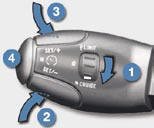
Turn thumb wheel 1 to the "CRUISE" position: the cruise control mode is selected but is not switched on (PAUSE).
Set the programmed speed by accelerating to the required speed, then press button 2 or 3 (e.g.: 70 mph (110 km/h)).
You can then change the programmed speed using buttons 2 and 3 :
- by + or - 1 mph (km/h) = short press,
- by + or - 5 mph (km/h) = long press,
- in steps of + or - 5 mph (km/h) = maintained press.
Switch off the cruise control by pressing button 4 : the display confi rms that it has been switched off (PAUSE).
Switch the cruise control back on by pressing button 4 again.
See also:
Capacities
...
Warning lamps
Left hand direction indicator
See “Signalling”.
Right hand direction indicator
See “Signalling”.
All the direction indicators flash simultaneously when the hazard warning
lamps are switched on ...
Manual adjustments
Forwards-backwards adjustment
Raise the control and slide the seat
forwards or backwards.
Driver's or passenger's seat height
adjustment
Pull the control upwards to raise
or push it downward ...