


Navidrive display
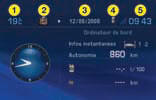
Presentation:
1 - A mbient temperature
2 - Directory
3 - Date
4 - Telephone
5 - Time
If the outside temperature is between +3 °C and -3 °C, the temperature display flashes (risk of ice).
Note: The outside temperature displayed may be higher than the actual temperature if the vehicle is standing in bright sunshine.
The driver is advised not to operate the controls when driving.
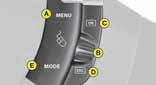
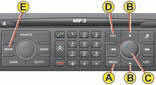
Controls
A - A ccess to the "Main menu".
B - S crolling in the display menus.
C - Validation and Selection in the menus, of the function chosen or value modified.
D - C ancellation of the operation or return to the previous display.
E - S election of the type of information you wish to see permanently displayed
(date, radio-CD, trip computer) on the right of the screen.
Main menu
Press control A to display the "Main menu" for the multifunction screen.
This menu gives access to the following functions (See "Navidrive" instructions):
 Navigation/guidance
 Map
Map
 Traffic information
 Audio
Audio
 Audio
Audio
 Configuration, for adjusting various
parameters (date, time, units)
Configuration, for adjusting various
parameters (date, time, units)
 Video
Video
 Vehicle diagnosis
See also:
Signalling
Direction indicators
Left, downwards.
Right, upwards.
For a change of direction, move the control stalk beyond the tight spot. The
indicator is automatically cancelled when the steering wheel r ...
Changing a wheel
Procedure for changing a faulty wheel
for the spare wheel using the tools provided
with the vehicle. ...
Locking the vehicle with
exterior protection alarm only
Deactivation of the interior
volumetric protection
Switch off the ignition.
Within ten seconds, press button A
until the indicator lamp is lit continuously.
Get out of the vehicle.
Lock o ...