


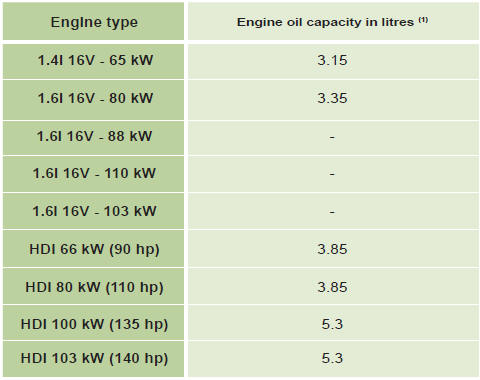
Capacities
See also:
Sunroof (saloon)
Glass sun roof
Sun roof closed
Press A to first notch: tilting.
Press A to second notch: automatic complete tilting.
Press B to first notch: sliding towards rear.
Press A to second notch: autom ...
Battery
Procedure for charging your battery
when it is fl at or for starting the engine
using another battery. ...
Vehicle identification
All original CITROËN replacement parts are available from CITROËN. It is in the
user’s interest, for his safety and for the sake of the warranty, to reject all
other parts. Fitting par ...