


Black panel
System allowing certain displays to be switched off for night driving.
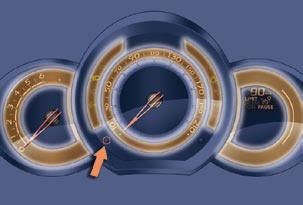
The instrument panel remains lit with the vehicle speed and cruise control or speed limiter information, if in use.
If there is an alert or a change in a function or to a setting, the black panel mode is interrupted.
Activation
- With the lighting on, press the left hand button of the instrument panel several times to progressively reduce the dashboard lighting level.
- Press the button again to reduce the lighting to the minimum level and switch off the ambience lighting.
- Press the button again to activate the black panel.
The dashboard lighting rheostat remains operational when in black panel mode.
See also:
Petrol - diesel manual gearbox instrument panels
Panel grouping together the vehicle operation indication dials and warning
lamps. ...
Visibility
Lighting
Ring A
Lighting off.
Automatic lighting.
Sidelamps.
Dipped or main beam.
Ring B
Front foglamps and rear foglamps.
Screen wipe
Windscreen wipe
2 Fast speed.
1 Normal ...
Signalling
Direction indicators
Left, downwards.
Right, upwards.
For a change of direction, move the control stalk beyond the tight spot. The
indicator is automatically cancelled when the steering wheel r ...