


Trip computer
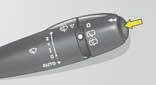
To obtain display and selection of the different types of information, give short presses on the end of the windscreen wiper stalk.
To reset trip computer information to zero, press continuously for a few seconds on the end of the stalk when one of the information types is displayed.
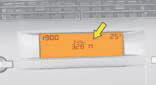
Display A
The trip computer provides 5 types of information, which can be accessed by pressing successively on the end of the control stalk.
• Range
• I nstantaneous fuel consumption
• D istance travelled
• A verage fuel consumption
• A verage speed
To cancel the display of the trip computer information press a sixth time
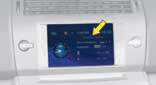
Display C or NaviDrive
3 types of instantaneous information:
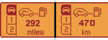
- Range
- Instantaneous consumption
- Distance remaining to be travelled
It also gives you access to 3 types of information for two Journeys 1 and 2:
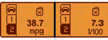
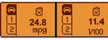
- Distance travelled
- Average consumption
- Average speed
Display C or NaviDrive (continued)
The journeys
Journeys 1 and 2 are identical but independent of each other. For example, you can use Journey 1 for daily calculations and Journey 2 for monthly calculations.
To reset a journey to zero
When the desired journey is displayed, give a long press on the end of the wiper stalk.
Permanent display
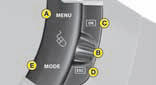
Pressing the "Mode" button causes the trip computer information to be displayed permanently.
Enter the distance to be travelled
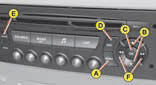
- P ress A.
- U sing B select the trip computer icon, then validate by pressing C.
- Select distance entry, using B.
Validate your choice by pressing C. - T o choose the distance, select the figure
to be modified using B then validate using C.
- U sing B, adjust the value then validate using C.
- Validate with "OK" in the display.
To display the log of alerts or status of functions
- P ress A.
- U sing B select the trip computer icon, then validate by pressing C.
- S elect the log of alerts or status of functions.
- O nce the list is displayed, scroll through the list using B.
- P ress D to return to the permanent display.
Display A

Range
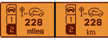
This indicates the mileage that can still be travelled using the fuel remaining in the tank.
When the distance remaining to be travelled is less than about 25 km (approx. 15 miles), only three dashes are displayed.
After resetting the computer, the indication of remaining range is only reliable after the vehicle has been used for a certain time.

Average fuel consumption
The average fuel consumption is calculated from the last reset of the computer.

Instantaneous fuel consumption
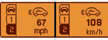
This is calculated from consumption over the previous 2 seconds. This function is only available when travelling at over 30 km/h (approx. 20 mph).

Average speed
The average speed is obtained, from the last reset of the computer, by dividing the distance covered by the time taken (ignition on).

Distance travelled
It indicates the distance travelled since the trip computer was last reset to zero.
Distance remaining
See previous page.
Display C or NaviDrive (continued)






See also:
Intelligent architecture for one of the most compact models in the segment
The new Citroen C3 is one of the most compact vehicles in its segment. At
3.94 m long and 1.71 m wide with a 10.8 m turning circle, it is perfectly
dimensioned for city driving.
The compact exte ...
Interior comfort
Glovebox
To open, pull the handle and lower the lid.
The glovebox has:
- Storage locations for pens, spectacles, telephone cards, etc.
- Three sockets for connecting audio/video equipment.
- A ...
Opening
Remote control key
A. Key release / storage.
B. Locking of the vehicle.
C. Unlocking of the vehicle.
D. Guide-me-home lighting.
Opening the boot
Press upwards on the lever E.
The boot autom ...