


Cargo net (Tourer)
the rear seats (row 2) when the luggage-cover blind is not fitted, or behind the front seats (row 1).
Note : when using behind the front seats, the backrests and the seat cushions must be folded down (see section on rear seats).
To install :
Fold down the backrests of the rear seats.
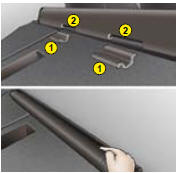
Position the cargo net roller over the two rails 1 located behind the rear seats (2/3 benchseat).
The two notches 2 must be positioned over the two rails.
Slide the 2 rails 1 into the notches 2 and push the roller (lengthwise) from right to left to lock it in.
Put the backrests of the rear seats back into place.
To use in row 1 :

Fold down the backrests of the rear seats.
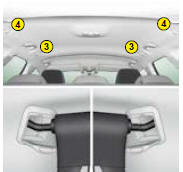
Open the covers 3 of the corresponding high fixing locations.
Unroll the cargo net and position one of the ends of the net’s metal bars in the corresponding fixing location. Ensure that the notch is correctly lodged in the rail located inside the location 3.
Pull on the cargo’s net’s metal bar to position the other notch in the 2nd fixing location.
To use in row 2 :

Open the covers 4 of the cor responding high fixing locations.
From the rear benchseat, unroll the cargo net by pushing it to disengage the retaining notches.
Position one of the ends of the cargo net’s metal bar in the corresponding fixing location. Ensure that the notch is correctly lodged in the rail located inside the location 4.
Position the other notch in the 2nd fixing location and pull the metal bar towards you.
See also:
Towbar
We recommend you to have this device fitted by a CITROËN Dealer, who will be
acquainted with your vehicle’s towing capability and with the procedures necessary
for installing a safety item of ...
Lighting controls
1 Off
2 Automatic lighting
3 Sidelamps
4 Dipped beam/Main beam
All lighting off
Turn the barrel A forward.
Automatic lighting of headlamps
Sidelamps and dipped beams come on automatically i ...
Recommendations for ventilation and air
conditioning
In order for these systems to be fully effective, follow the operation and
maintenance guidelines below:
To obtain an even air distribution, take care not to obstruct the
exterior
air intake ...