


Controls
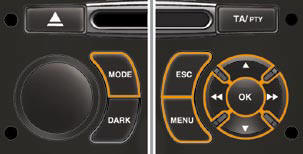
From your Audio system control panel, you can:
press the "MENU" button to gain
access to the general menu ,
press the " " or " " buttons to scroll
through the items on the screen,
press the "MODE" button to change
the permanent application (trip
computer, audio source...),
press the " " or " " buttons to
change a setting value,
press the "OK" button to confi rm,
or
press the "ESC" button to abandon
the operation in progress.
See also:
Rear lamps
(3-door model)
Identify the failed bulb.
Bulbs:
- Direction indicator: P21 W.
- Reversing lamp: P21 W.
- Stop lamps and sidelamps: P21/5.
Removal
To have access to the nut B, detach the boot ...
Unlocking the vehicle
Unfolding the key
First press button A to unfold the
key.
Unlocking using the remote control
Press the open padlock to
unlock the vehicle.
Unlocking using the key
Turn the key to the left in ...
Sun visor
Component which protects against sunlight
from the front or the side.
Version without Zenith windscreen
The sun visors are fi tted with a courtesy
mirror, with concealing fl ap for the driver
a ...