


Navigation
Information for two journeys 1 and 2
A first rotation of control knob A on the steering wheel allows you to display the information for journey 1.
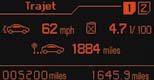
Average speed
This is calculated (since the last reset to zero of the trip computer) by dividing the distance travelled by the time taken (with the engine running).
Average consumption
This is the relationship between the fuel consumed and the distance travelled since the last reset to zero of the selected journey.
Distance travelled
This is the distance that has been travelled since the last reset to zero of the journey selected.
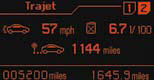
A second rotation of control knob A steering wheel.
allows you to display the information for journey 2.
Journeys
Journeys 1 and 2 are independent of each other but identical in use.
They allow you, for example, to assign journey 1 for daily calculations and journey 2 for monthly calculations.
Reset a journey to zero
When the required journey is displayed, make a long press on the left-hand control knob A on the steering wheel.
Return to the main instrument panel screen display
Successive rotations of the control knob A on the steering wheel allow you to return to the main instrument panel screen display (vehicle speed), via the navigation information screen, then the screen displaying only the total mileage and the trip mileage (bottom of screen).
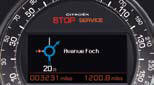
Display of navigation information on instrument panel screen
You can display navigation information on the instrument panel screen by rotating the left-hand knob A on the steering wheel.
See also:
Front side reading lamps
With the ignition on, the fi rst press of
the corresponding switch switches
on the reading lamp concerned in
permanent lighting mode.
Following a second press, it comes on:
- when the vehicle is ...
Jack socket
This connection box, consisting of a
JACK socket is located on the centre
console.
It permits the connection of portable
equipment, such as a digital audio player
of the iPod ® type.
It reads ...
Manual controls
The lighting commands are issued directly
by the driver by means of the
ring A and the stalk B .
Model without AUTO lighting
Model with AUTO lighting
A. Main lighting mode selection ring,
wi ...